> ## Documentation Index
> Fetch the complete documentation index at: https://documentation.claruswms.com/llms.txt
> Use this file to discover all available pages before exploring further.
# Continuous Replenishment
> Configure continuous pickfaces to keep stock available automatically using minimum and maximum triggers.
**Continuous Replenishment** keeps pickface locations consistently stocked. A replenishment task is generated automatically whenever stock drops below the configured **minimum trigger**, topping the pickface up to the **maximum trigger** (or to the next full storage unit). It's the right choice for fast-moving stock that should always be available.
For an overview of both strategies, see [Pickface Replenishment](/knowledgebase/warehouse-setup/replenishment/overview).
## How it works
1. **Stock is replenished into the pickface** either through a manual transfer when first setting up the location, or automatically once picks drop the level below the minimum trigger.
2. **A pick task is generated.** When a sales order needs stock from the product, the system assigns the task to the first available continuous pickface in the order defined on the product setup screen.
3. **Stock is validated across pickfaces.** Before assigning the task, the system checks availability and any shelf-life criteria across all configured pickfaces. If multiple pickfaces qualify, the task goes to the next pickface in rotation. If none qualify, the task goes [on hold](/knowledgebase/warehouse-setup/replenishment/on-hold-picks) until a qualifying replenishment occurs.
4. **Pick tasks are distributed evenly.** When several tasks are generated for the same product, the system cycles through all eligible pickfaces in priority order (task 1 → A, task 2 → B, task 3 → C, task 4 → A…).
5. **Replenishment is triggered automatically.** Any movement that drops stock below the minimum trigger — picks, transfers, negative adjustments — creates a new replenishment task to bring the pickface back up to capacity.
## Setting up a continuous pickface
From the left-hand menu, click **Products** and select the product you want to configure.
Open the **Pickface** panel and click **New** to add a pickface location. You can also assign a **Location Group** to manage multiple pickfaces in one go — every location in the group must have **Is Pickface** set to **Yes**.

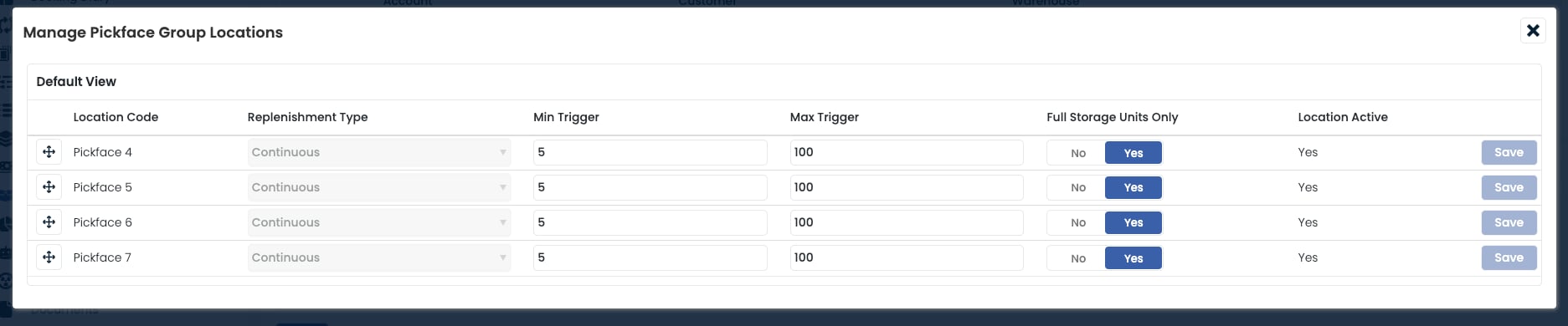 Choose **Continuous Replenishment** as the strategy. A replenishment task will be generated automatically each time stock drops below the minimum trigger.
* **Minimum Trigger**: the stock quantity that triggers a replenishment task when levels drop below it.
* **Maximum Trigger**: the target quantity to top the pickface up to.
If **Full Storage Units Only** is set to **Yes**, the maximum trigger is overridden — only full storage units will be replenished.
* **No**: the replenishment tops the location up to the maximum trigger exactly, breaking a storage unit if needed.
* **Yes**: only full storage units are replenished. For example, if the maximum trigger is 100 and each storage unit holds 60, the system brings in two full units totalling 120.
Choose **Continuous Replenishment** as the strategy. A replenishment task will be generated automatically each time stock drops below the minimum trigger.
* **Minimum Trigger**: the stock quantity that triggers a replenishment task when levels drop below it.
* **Maximum Trigger**: the target quantity to top the pickface up to.
If **Full Storage Units Only** is set to **Yes**, the maximum trigger is overridden — only full storage units will be replenished.
* **No**: the replenishment tops the location up to the maximum trigger exactly, breaking a storage unit if needed.
* **Yes**: only full storage units are replenished. For example, if the maximum trigger is 100 and each storage unit holds 60, the system brings in two full units totalling 120.
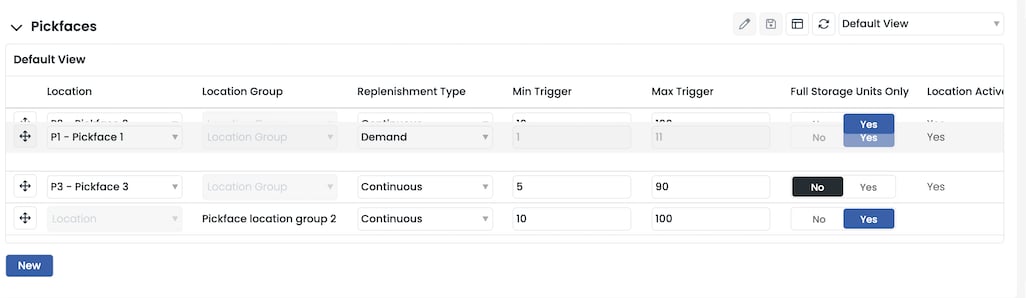
 Use the **arrow controls** on the left of each row to reorder locations. The order determines the sequence in which pickfaces are used when assigning pick tasks and replenishments.
 The account's **Pick Rule** determines which stock is brought into the pickface during a replenishment. FIFO uses the earliest FIFO date, Sell by Date uses the earliest sell-by date, and Best Before Date uses the earliest best-before date.
## Combining with demand replenishment
The Continuous and Demand strategies can run on the same product by assigning them to different locations — typically a Continuous primary and a Demand secondary for shelf-life-sensitive picks. See [Combining strategies](/knowledgebase/warehouse-setup/replenishment/combining-strategies).
## Frequently asked questions
When several continuous pickfaces are assigned to the same product, Clarus distributes pick tasks across them in the configured order, cycling back to the first when it reaches the end. The order in the Pickface panel is the order Clarus uses.
Pick tasks are no longer assigned to the inactive pickface and replenishment tasks stop generating, even if stock falls below the minimum trigger. Any existing stock stays in the location and must be moved manually.
If no pickface meets the stock or shelf-life criteria, the pick task is placed **On Hold**. As soon as a replenishment brings in stock that satisfies the criteria, Clarus releases the task automatically. Hovering over the status in the Tasks data grid shows the reason for the hold.
The account's **Pick Rule** determines which stock is brought into the pickface during a replenishment. FIFO uses the earliest FIFO date, Sell by Date uses the earliest sell-by date, and Best Before Date uses the earliest best-before date.
## Combining with demand replenishment
The Continuous and Demand strategies can run on the same product by assigning them to different locations — typically a Continuous primary and a Demand secondary for shelf-life-sensitive picks. See [Combining strategies](/knowledgebase/warehouse-setup/replenishment/combining-strategies).
## Frequently asked questions
When several continuous pickfaces are assigned to the same product, Clarus distributes pick tasks across them in the configured order, cycling back to the first when it reaches the end. The order in the Pickface panel is the order Clarus uses.
Pick tasks are no longer assigned to the inactive pickface and replenishment tasks stop generating, even if stock falls below the minimum trigger. Any existing stock stays in the location and must be moved manually.
If no pickface meets the stock or shelf-life criteria, the pick task is placed **On Hold**. As soon as a replenishment brings in stock that satisfies the criteria, Clarus releases the task automatically. Hovering over the status in the Tasks data grid shows the reason for the hold.
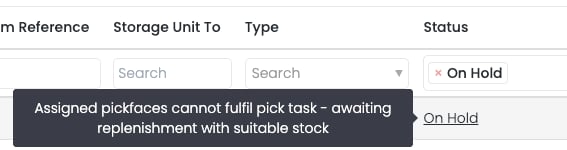 See [Understanding On Hold picks](/knowledgebase/warehouse-setup/replenishment/on-hold-picks) for the full release behaviour.
With **Full Storage Units Only** set to **Yes**, Clarus brings in full storage units even if doing so exceeds the maximum trigger. With it set to **No**, the system tops up to the maximum trigger exactly and breaks a storage unit if necessary.
Any movement that drops the pickface stock below the minimum trigger creates a replenishment task — including picks, manual transfers, warehouse transfers, and negative stock adjustments.
No. Continuous pickfaces use soft allocation. Stock is only hard-allocated when it is picked or when [demand replenishment](/knowledgebase/warehouse-setup/replenishment/demand) is involved.
See [Understanding On Hold picks](/knowledgebase/warehouse-setup/replenishment/on-hold-picks) for the full release behaviour.
With **Full Storage Units Only** set to **Yes**, Clarus brings in full storage units even if doing so exceeds the maximum trigger. With it set to **No**, the system tops up to the maximum trigger exactly and breaks a storage unit if necessary.
Any movement that drops the pickface stock below the minimum trigger creates a replenishment task — including picks, manual transfers, warehouse transfers, and negative stock adjustments.
No. Continuous pickfaces use soft allocation. Stock is only hard-allocated when it is picked or when [demand replenishment](/knowledgebase/warehouse-setup/replenishment/demand) is involved.