

Why a pick goes on hold
A pick is placed on hold for one of two reasons:- No pickface holds qualifying stock. Every continuous pickface for the product either has no stock or holds stock that fails the criteria — usually a customer’s shelf-life rule (maximum sell-by date, minimum days remaining, FIFO date).
- A demand pickface is configured but not empty. Demand replenishment needs an empty location to move a full pallet into. If every demand pickface still has stock, both the pick task and the replenishment task wait.
Inspecting an On Hold task
The Status column shows the hold, and hovering over the value reveals the reason: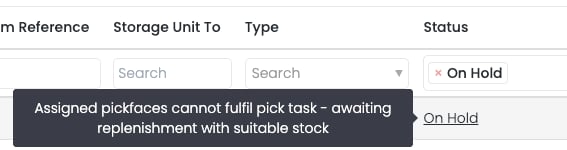
- Picking List — add the Status column to the data grid to see whether any pick on a list is on hold.
- Tasks — locate the task in the Tasks data grid and check the Status column. The hover tooltip works here too.
How Clarus releases tasks automatically
Clarus monitors every inbound stock movement into a pickface — replenishments, manual transfers, and putaways — and re-checks any tasks currently on hold for the same product. A few important behaviours to know:- Criteria, not quantity. The release check only asks “does the new stock satisfy this task’s criteria?”. It does not check whether there is enough stock to cover every on-hold task. The first task to qualify is released; further replenishments may be needed to clear the queue.
- Oldest holds first. When multiple tasks are released by the same replenishment, they are queued in the order they were placed on hold.
- All inbound movements count. Transfers and putaways trigger the same check as a system-generated replenishment.
Example release sequence
- 5 pick tasks are on hold, each needing a quantity of 20.
- The pickface has a maximum trigger of 80 and a minimum trigger of 0.
- Clarus checks whether the new stock satisfies the on-hold tasks. All 5 do.
- All 5 tasks move to Available in the order they were placed on hold.
- Operatives complete 4 of the picks, depleting the pickface.
- A new replenishment is triggered.
- Once that replenishment finishes, the fifth pick can be completed.
When you need to step in
Clarus will release a task on its own whenever qualifying stock arrives. You typically only need to intervene if:- The demand pickface has been left with stock. Move or pick the residual stock so the demand pickface is empty and the queued replenishment can fire.
- No stock in racking meets the criteria. Bring stock in, transfer from another warehouse, or — with the customer’s agreement — relax the customer’s shelf-life rules on the product so the existing stock qualifies.
- A replenishment task itself is stuck. A user can cancel an available replenishment task from the Tasks page using the Cancel button on the data grid, then start the process again.